Newsfeed
TIP 14 - After Launch - My Data Share This

TIP 14 - After Launch - My Data
When you log in to your Sell Data back office, information about the data we collect from you is under this MY DATA menu link. We run a transparent and honest data collection service. Our extension is laser focused on collecting data we need to operate our advertising business. We cannot see anything you enter on a webpage form or search, the only data we collect is from the URL bar at the top of your browser. You can stop us from collecting data temporarily by using a different browser, disabling the extension or opening a private browser. You can stop us collecting data forever by uninstalling our extension, but this action will also cease your earnings from Sell Data Income and vBonus. $5B do not sell, use, rent, share or distribute your personal data. Your data profile is used without your personal data to create an anonymous data footprint that is linked to you by encrypted keys. For more information about vBonus, click here...
TIP 13 - After Launch - vBonus Share This

TIP 13 - After Launch - vBonus
Sell Data users collect browsing data and return to their Sell Data back office where it is validated to ensure the data is not farmed by bots. You will be required to validate 3x a week. You will be paid for each day you used our extension. You will not be paid for days you do not. Daily Sell Data Earnings is $1.10 and you will be paid EXTRA income called vBonus each time you validate your data. vBonus is paid as an additional income to Sell Data Earnings. vBonus is worth up to $3.50 extra weekly @ rate of $0.50 each day/validation. You can only validate 1x day. Utilizing vBonus, you can boost earnings to $1.60 daily or $584 yearly passive income. Affiliates can also earn vBonus as an extra income stream (details to be released soon). See in the image where you will find what you have earned from Sell Data when we launch! Monday we start gearing up and pushing forward!
SHARE THIS BY CLICKING THE LINK TOP RIGHT
TIP 12 - Live Now - Account Settings Share This

TIP 12 - Live Now - Account Settings
Right now this feature will change your affiliate email, password, username and secret code. However, after launch you will get 3x dashboards controlled by a Money Maker account. Your Money Maker account is like the master profile and will connect you to all 3 dashboards with 1x username, 1x password, 1x email and 1x secret code for everything you do on $5B! Please learn this tip so you can control your login. (1) - Manage your email address. You can change your registered email to a new email. (2) - Change your password. (3) - Change your username/affiliate ID. (4) - Set up or change your secret code. (5) Confirm your changes by email verification or EASIER = (6) Use Secret Code to confirm and save changes.
TIP 11 – After Launch – Affiliate Stats Share This

TIP 11 – After Launch – Affiliate Stats
This is the new menu where you will find a breakdown of your stats for commission and overrides. You generate commission from your own work and your downline earns you overrides from their work. On launch there will be (1) registration form and people that click your link will join and begin life as a Money Maker. Money Makers can upgrade to Sell Data, Refer & Earn Affiliates and Advertisers. The stats pages will show you who is what and how much they are earning you! To claim your commission and overrides, you go to (2) and (3) which then transfers your earnings to your wallet. When you are on your dashboards you can get back to the Money Maker Page by clicking (1). Thank you for being patient at this very difficult time we are experiencing, but as you can see, we are constantly building for the patient affiliates. When we update you, it will be here...
TIP 10 - Mixed Live & After Launch - Some important points affiliate dash Share This

TIP 10 - Mixed Live & After Launch - Some important points on your affiliate dashboard
(L) = Live. (AF) = After Launch.
1 (L) - Click to see your sponsor. This is your sponsor's name.
2 (L) Profile levels you have achieved. Levels attract rewards. Rewards will be announced (AF).
3 (L) - Click this button to get your affiliate link. Copy the affiliate link, NEVER write it. Always click your own link to make sure it works before promoting it.
4 (L) - Your username.
5 (L) My Status links you to everything there is to know about your account. You must click this button now!
6 (L) Click your profile picture. It will open main menu for managing your affiliate account. Profile = Manage profile | Settings = Change password, change email, setup/change secret code and more...
7 (L) Join our Telegram.
8 (AF) - List of your account stats and who earned you commission and overrides.
9 (L) Lots of tips and material to promote your affiliate account. (AF) = Marketing material to promote Sell Data and more.
10 (L) Shows how many people clicked your affiliate link.
11 (AF) - Hugely important: You must click this banner in your affiliate dashboard on your first login after launch. It is also in your Sell Data dashboard! View your dashboard...
TIP 9 - Live Now - Profile & Edit Profile Share This

TIP 9 - Live Now - Profile & Edit Profile
You can add to your profile to promote your links to your sponsors. Change name, address, post code/zip, number and more. Now we are moving to KYC after launch, you will need to check your profile name is correct. It must match your proof of ID. You can update your profile anytime, but if it needs updating, please correct it before KYC. See the images to know where your Profile is. Edit profile can be done easily. This is active now. For updates about launch, see here...
TIP 8 - After Launch - Affiliate Dash Tutorial Share This

TIP 8 - After Launch - Affiliate Dash Tutorial
Your existing dashboard has been upgraded extensively with new features to include a Step-by-Step Guide for new affiliates and pre-launch affiliates. The steps will help sponsors train new affiliates to recruit and promote services to increase earnings. Step 1 shows affiliates how commission is earned and the difference between Overrides and Commission. Money Makers can print all the steps in their site language or view all the steps in one long page as well as step -by-step. We are here to help our affiliates make money. More news coming soon...
TIP 7 - After Launch - My Affiliate Commission Share This
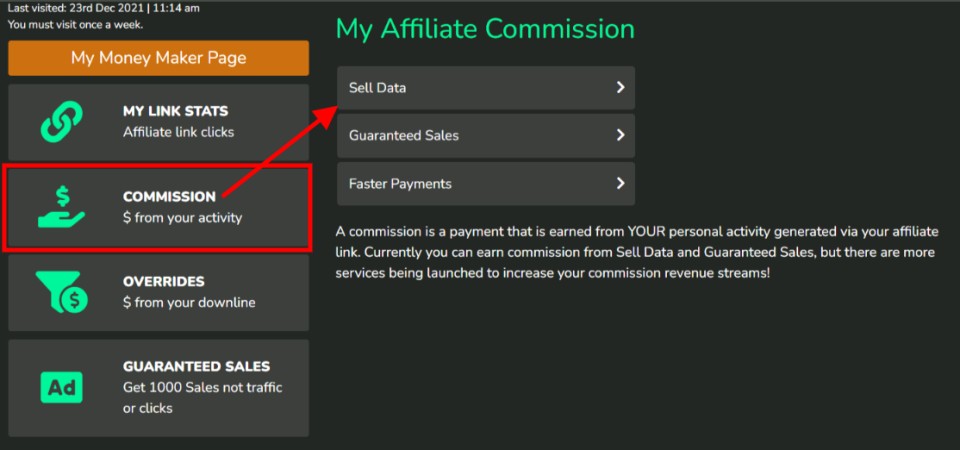
TIP 7 - After Launch - My Affiliate Commission
The existing commission box on the left side of your affiliate dashboard will be activated to show your affiliate commission like this. Commissions: A commission is a payment that is earned from YOUR personal activity generated via your affiliate link. Commission is not Overrides. You get paid overrides on top of commission. Overrides: Overrides are payments generated from the activity of affiliates in your 16 level network/downline. Then there are affiliate bonus and rewards which will be covered soon. We are building for our community of Money Makers. More news coming soon...
TIP 6 - After Launch - Testimonials Share This
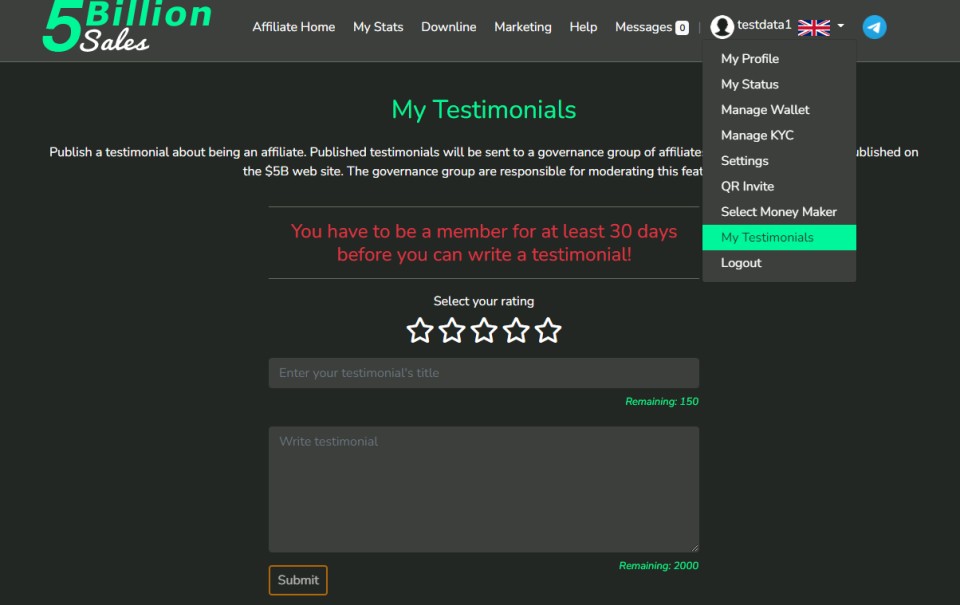
TIP 6 - After Launch - All Users.
This is where you write an amazing testimonial about your experience with $5B. Check Updates
Tip 5 - After Launch - Sell Data Back Office Home Share This
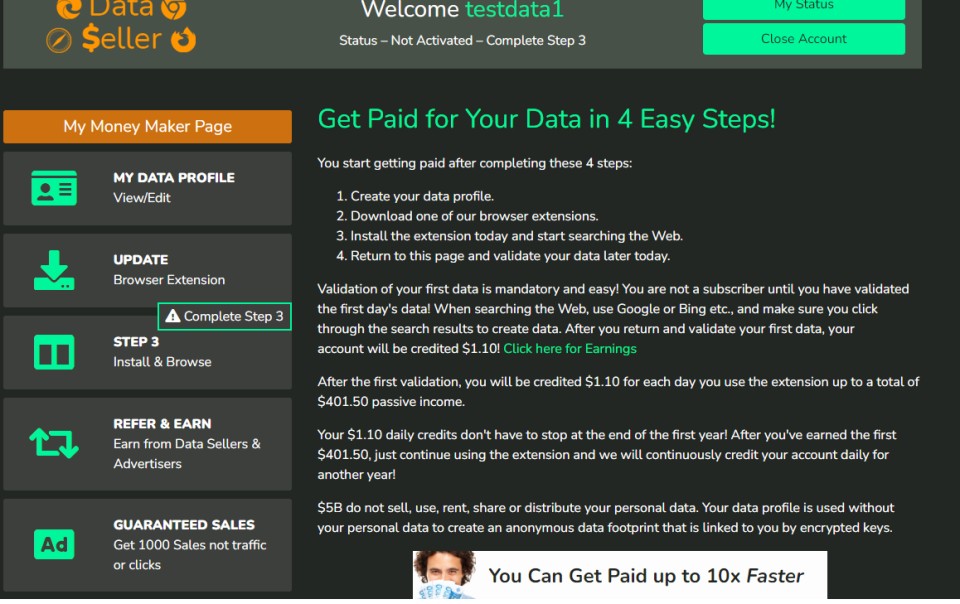
Tip 5 - After Launch - Sell Data Back Office Home.
This is where your Sell Data clients will EARN money from their Web browsing! Affiliates can join too and earn the $401.50 PLUS vBonus! The future is great for our affiliates. Affiliates make $5B and every affiliate can make it with $5B. Users access their Sell Data back office from their Money Maker Page. Login and select Sell Data and 'go make money' from your Web activity. Check Updates